
Read this article in: Portuguese (Português) · Spanish (Español)
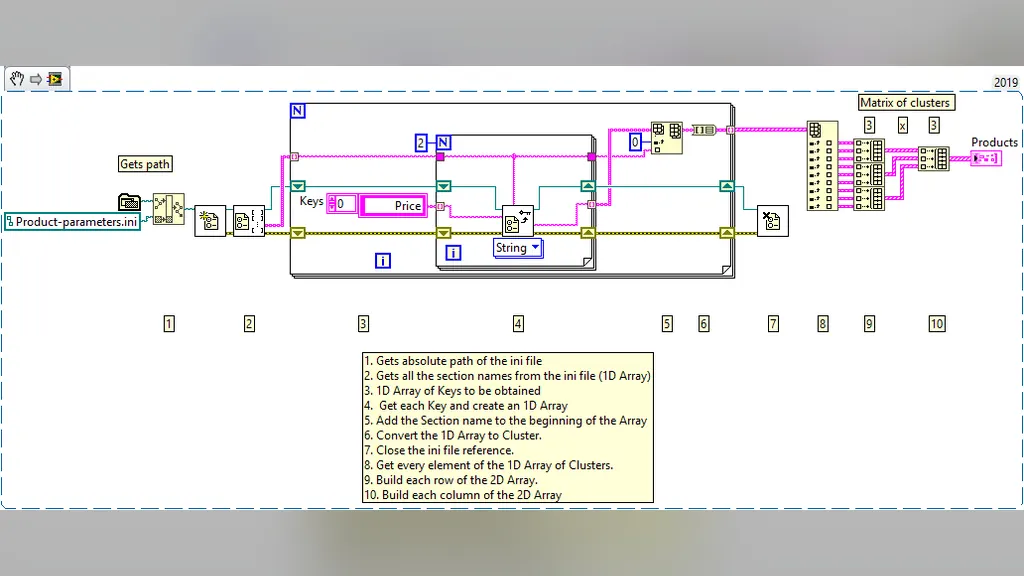
LabVIEW is a development and system design platform that revolutionized the field of industrial automation and data acquisition. Created and distributed by National Instruments, the system pioneered the use of a visual programming language. Instead of writing complex lines of code, the developer builds programs by dragging and connecting graphical blocks, creating a data flow diagram. This graphical approach simplifies the development of virtual instruments (VIs) and is widely used for equipment control, signal processing, and test automation.
LabVIEW’s relevance in the market is proven by its long history and adaptability. Originally launched in 1986, the system already demonstrated its capability to be a robust environment for various applications. Today, it maintains cross-platform support, running on operating systems such as Windows, macOS, and Linux. This versatility, combined with support for various programming languages, such as C, C++, and C#, ensures that the platform remains at the forefront of control and data analysis.
In this article, we will dive into the complete history behind this tool. We will start with the origins of LabVIEW and the historical context of National Instruments, before understanding the problem that graphical programming solved. We will analyze the architecture and functioning of data flow, explore the platform’s development and advanced capabilities, and finally, provide an overview of its evolution, the latest versions, and the vast user ecosystem.
Key Points
- Developed by National Instruments (NI) and launched in 1986, LabVIEW is a robust tool for control and measurement.
- It utilizes the dataflow programming paradigm, where the execution of a node depends on the availability of input data.
- It is highly suitable for Data Acquisition, instrument control, test automation, and signal processing.
- The platform is cross-platform, offering native support for operating systems such as Windows, macOS, and Linux.
- A program is composed of Virtual Instruments (VIs), which have a tripartite structure: Front Panel, Back Panel, and Controls.
LabVIEW in Summary
| Developer | National Instruments |
|---|---|
| Year of Release | 1986 |
| Languages | C, C++, C# |
| Platforms | Cross-platform: Windows, macOS, Linux |
| Application Types | Data acquisition, instrument control, test automation, analysis and signal processing, industrial control, embedded system design |
| License | Proprietary |
The Origins of LabVIEW: The Historical Context of National Instruments
The growing need for real-time measurement and control systems, especially in the fields of industrial automation and data acquisition, presented a significant challenge for engineers. It was imperative to develop tools that allowed specialists to interact with complex equipment and process information efficiently. It was in this context that National Instruments (NI) developed what would become LabVIEW. The tool’s history begins with a fundamental technical milestone: the first release of LabVIEW, version 1.0, occurred in October 1986.
The Beginning on the Apple Macintosh
Initially, LabVIEW development was aimed at the Apple Macintosh platform. Although the developers planned to target the popular IBM PC, they chose to focus on the Macintosh to create an initial prototype, believing it would be a faster path. This initial focus, however, highlighted the magnitude and ambition of the project. It took considerable time for LabVIEW to migrate and adapt to other architectures, such as the IBM PC, until an adequate *windowing* environment was available on the platform.
The trajectory of LabVIEW shows constant technological maturation and increasing adaptability. The evolution did not stop there. Starting in 2005, with the release of LabVIEW 8.0, the platform’s life cycle stabilized into an annual rhythm. Major versions began being released in the first week of August, coinciding with the annual National Instruments (NI Week) conference. Following this, a bug-fix release was scheduled for February of the following year.
Standardization and Continuous Evolution
Over the years, National Instruments itself adjusted the nomenclature to reflect the product’s growth and maturity. An important milestone in this process occurred in 2009, when the company began naming releases with the year they were developed. For example, Service Pack 1 of 2009 was released in February 2010, consolidating a more predictable release standard.
The platform’s life cycle continued to restructure itself, demonstrating its ability to keep pace with changes in the technology market. In 2017, for example, National Instruments promoted a change in the date of the annual conference, moving it to May. It was during this period that LabVIEW 2017 was launched, accompanied by a complete redesign of the platform, introducing LabVIEW NXG 1.0, built on Windows Presentation Foundation (WPF) technology. This constant reinvention—from its initial focus on the Macintosh to the adoption of modern frameworks—underlines NI’s commitment to keeping LabVIEW at the forefront of automation, allowing it to be used in various applications, such as instrument control, signal analysis, and embedded systems.
The Problem Graphical Programming Solved
The modern industrial and scientific environment requires measurement and control systems of extremely high robustness. Engineers and researchers needed tools capable of monitoring, analyzing, and interacting with physical equipment in real time, a field that is the core of Data Acquisition (Data Acquisition) and Instrument Control. The complexity of these tasks lay not only in the science behind measurement but in the need to translate physical and logical flowcharts into code that was, at the same time, extremely precise and, ideally, understandable.
The Limitations of Text Programming
Before the graphical approach, the development of control systems relied heavily on pure text-based programming languages. Although these languages were powerful, they presented significant challenges when applied to complex hardware systems. Manipulating small snippets of code could actually cause deep restructuring throughout the entire program. The process of adding or modifying a functional block required the programmer to go back and “re-wire” the logical and symbolic connections, a process that increased the learning curve and the risk of errors. Furthermore, the tendency to add unnecessary variables, while a comfort for the programmer, ended up slowing down development and distorting the ideal data flow model.
The Dataflow Revolution
LabVIEW solved this dilemma by introducing the dataflow programming paradigm (dataflow programming). Instead of following a rigid sequential order of textual commands, LabVIEW structures the program in a graphical block diagram. In this model, the data flow is the central element: the execution of any function (or node) only occurs when all necessary data for its inputs becomes available. The programmer does not write a command but rather connects function boxes (nodes) with virtual wires, which represent data variables. This visualization makes the reasoning process much more intuitive, mirroring the operation of a physical circuit.
This graphical architecture allows LabVIEW not only to simulate but also to control real-world systems, ranging from mathematical and statistical processing to sensor data capture. The platform has become a vast ecosystem, complemented by specialized libraries covering everything from signal conditioning and filtering to embedded system management. Although LabVIEW was launched in 1986 by National Instruments, it remains a fundamental tool, supporting operations on cross-platform operating systems like Windows, macOS, and Linux, and being used in various capacities, such as test automation and signal processing.
In summary, graphical programming transformed the control and measurement process, moving it from a highly complex textual task to a visual and logical flow. The programmer can thus focus on the system’s architecture—the path data takes—instead of getting lost in the syntax and structural complexities of purely textual languages. This accessibility, without compromising technical power, is what established LabVIEW as a standard in industrial and scientific automation.
The Dataflow Architecture and Operation
LabVIEW’s architecture is built upon a central concept that revolutionized how control and measurement systems are programmed: the dataflow programming paradigm. Unlike traditional languages that follow a linear sequence of commands, LabVIEW operates based on data availability. In this model, the execution of any function or graphical node is only triggered when all necessary input data for its processing is ready.
Dataflow Logic
This logic is visualized in a graphical block diagram, which constitutes the program’s source code. The programmer builds the flow by connecting nodes and wires. The wires, essentially, propagate data like variables. The system’s strength lies in the fact that if multiple nodes have their inputs available simultaneously, LabVIEW can process them in a conceptually parallel manner. The system uses an internal scheduler to automatically exploit multi-processing and multi-threading hardware resources, executing nodes ready for execution.
Virtual Instrument (VI) Components
A program in LabVIEW is composed of one or more Virtual Instruments (VIs). Each VI is a collection of nodes and wires and has a tripartite structure to manage both the user interface and the processing code. These three components are:
- Front Panel: This is the user-facing part. It is built with controls, which function as inputs (allowing the user to provide information to the VI), and indicators, which are outputs used to display results.
- Back Panel: This is the programmer’s panel and contains the graphical block diagram, which is the actual source code. All objects placed on the Front Panel appear here as terminals. This is where structures and functions that perform mathematical and statistical operations are inserted.
- Connector Panel: This panel contains terminals that serve to represent the VI when it is embedded in another larger program, whether that program is upstream or downstream.
Execution and Modularity
The flexibility of the VI allows it to be executed in two main ways. First, it can be run autonomously, using the Front Panel as an interface. Second, and perhaps more powerfully, it can be treated as a node within the block diagram of another VI. In this case, the VI operates as a sub-routine, and the Front Panel only controls the node’s inputs and outputs, allowing the program to be tested in isolation and then embedded into a larger system. This capability of modularity, combined with data flow, allows the program, for example, to display the sum of two values provided by controls, activating the indicator as soon as the data is available.
In summary, this graphical approach not only simplified program creation, allowing non-programmer users to assemble applications by dragging and dropping visual elements, but also provided a robust foundation for developing complex systems capable of operating in distributed models that utilize their inherently parallel nature.
Platform Development and Advanced Capabilities
The robustness and processing power of LabVIEW are supported by advanced technical capabilities that go far beyond a simple graphical interface. First, the platform offers extensive support for interconnection with a wide range of devices, including instruments, cameras, and other peripherals. Users can establish this communication in two ways: by writing direct bus commands (such as USB, GPIB, and Serial) or by using high-level drivers specific to the device. To facilitate development, National Instruments provides thousands of drivers in its Instrument Driver Network (IDNet). Furthermore, LabVIEW has native support for National Instruments’ own products, such as the CompactDAQ and CompactRIO hardware platforms, as well as specialized toolsets, like the Measurement and Automation eXplorer (MAX) and the Virtual Instrument Software Architecture (VISA), ensuring that communication with the physical world is comprehensive and standardized.
High-Performance Compilation and Execution
One of the most technical and important aspects of LabVIEW is its compiler. It is responsible for transforming the graphical code, known as “G” code, into native code for supported CPU platforms. This process is not trivial: the visual code is first converted into a Dataflow Intermediate Representation (*Dataflow Intermediate Representation*), and then translated into machine code fragments executable by an LLVM-based compiler. These fragments are called by the execution engine (“G” run-time engine), which ensures fast and high-performance execution of the graphical code. Although LabVIEW programs might be slightly slower than directly compiled C code, the use of a portable run-time environment allows source code files to be transferred between different supported platforms while maintaining project integrity.
Advanced Processing and Parallel Programming
The platform’s analytical capacity is expanded by a vast collection of libraries. These libraries contain specialized functions for data acquisition, signal generation, mathematics, statistics, conditioning, and signal analysis, in addition to allowing data capture directly from hardware sensors. Complementing this ecosystem, LabVIEW includes MathScript, a text-based programming component that can be integrated into the graphical environment through *script nodes*. MathScript uses a syntax generally compatible with MATLAB for signal processing and mathematical analysis tasks. Furthermore, LabVIEW is an inherently concurrent language. This means it is extremely easy to program multiple tasks that must be executed in parallel, utilizing the concept of *multithreading*. This feature is particularly valuable in test automation systems, where it is common and necessary to run processes such as test sequencing, data logging, and hardware interfacing simultaneously.
Evolution, Versions, and the User Ecosystem
The longevity of LabVIEW is a testament to its adaptability and resilience in the field of automation and control. Since its release in 1986, the platform developed by National Instruments has tracked and, in many cases, driven technological advancement in various industries. Its cross-platform nature is a fundamental pillar of this longevity, ensuring that developers can create and run applications for data acquisition, instrument control, test automation, and signal processing across multiple operating systems, including Windows, macOS, and Linux.
Evolution and Technical Foundations
Over the decades, LabVIEW has not only maintained its graphical programming paradigm but has also modernized technically. Its programming base is supported by robust languages like C, C++, and C#, allowing the platform to connect to a vast spectrum of functionalities. Continuous evolution is visible in its most recent versions, such as LabVIEW NXG 5.1 and LabVIEW 2026 Q1, demonstrating a constant commitment to performance and embedded systems support. These advanced capabilities allow the software to be applied from industrial control to the design of complex embedded systems, solidifying its role as a versatile tool for statistical analysis and processing.
The Expansion Ecosystem
What truly guarantees the expansion and vitality of LabVIEW is its user ecosystem and community support. The platform was designed to be extensible, and this characteristic is amplified by a vast collection of third-party components. Developers do not need to reinvent the wheel; they can extend functionalities through add-ons. These components are managed by official tools, such as the VI Package Manager (VIPM), which facilitates the download and installation of code packages. Furthermore, National Instruments maintains a dedicated marketplace called NI Tools Network, where both free and paid add-ons are available.
In terms of human support, LabVIEW has an active and global community. For the academic environment, there is a low-cost Student Edition, facilitating learning and research in educational institutions. Communication and knowledge sharing are maintained through email lists and internet forums, creating a virtuous cycle of innovation. It is this combination of a solid technical core, constant updates—such as LabVIEW 2026 Q1—and a robust, collaborative ecosystem that ensures LabVIEW’s relevance and processing power in critical engineering and scientific applications.
Frequently Asked Questions
What is the difference between graphical and textual programming?
Textual programming follows a rigid sequential order of commands, making modification difficult. LabVIEW, on the other hand, uses dataflow programming, which is graphical. In this approach, the code is a block diagram where any function’s execution only occurs when all necessary input data becomes available, making the reasoning more intuitive.
Is LabVIEW compatible with different operating systems (Windows, Mac, Linux)?
Yes, LabVIEW is a cross-platform platform. It was designed to operate on various operating systems, including Windows, macOS, and Linux. This compatibility ensures that engineers can develop and execute control and measurement systems in different hardware environments, maintaining code portability.
For what type of projects is LabVIEW most suitable: academic or industrial?
LabVIEW is extremely suitable for both, but it is particularly strong in industrial and scientific environments that require high robustness. It is ideal for real-time measurement and control systems, test automation, and complex signal analysis, allowing the programmer to focus on the system architecture, and not just the code syntax.
What is a Virtual Instrument (VI) and how does it work in LabVIEW?
A Virtual Instrument (VI) is the basic unit of a LabVIEW program, consisting of a collection of nodes and wires. It has a tripartite structure: the Front Panel (user interface), the Back Panel (graphical block diagram, the source code), and the Connection Panel. This modularity allows the VI to run autonomously or be embedded in other systems.
Is LabVIEW an open-source programming language?
No. According to the provided data, LabVIEW has a proprietary license. Although it is a powerful and widely used development tool, it is not classified as open-source software. Its architecture and use are managed by National Instruments (NI).
Conclusion
The trajectory of LabVIEW is much more than a simple software history; it represents a revolution in the paradigm of control and measurement. By replacing the rigidity of textual languages with a graphical block diagram, the platform introduced the concept of dataflow programming. In this model, the code is not a linear sequence of commands, but rather a visual and logical flow where each function is only triggered when all necessary input data is available. This approach makes the reasoning process more intuitive, mirroring the physics of real circuits and allowing the programmer to focus on the system architecture, rather than the complexity of the syntax.
Since its initial release in 1986, LabVIEW has demonstrated a remarkable adaptability. Its evolution, moving from a focus on the Macintosh to support on modern cross-platform systems, and its constant reinvention in *frameworks* advanced, attest to its commitment to the forefront of automation. This robustness keeps it essential for the industrial and scientific environment, being fundamental for applications that require extremely high precision in data acquisition and real-time instrument control. LabVIEW has thus consolidated itself, not merely as a tool, but as a complete ecosystem of solutions.
Understanding this evolution is recognizing that ease of use and technical power can coexist. For those interested in cutting-edge automation, diving into LabVIEW is taking the first step toward mastering the visual language that is shaping the future of Industry 4.0.