
Read this article in: Portuguese (Português) · Spanish (Español)
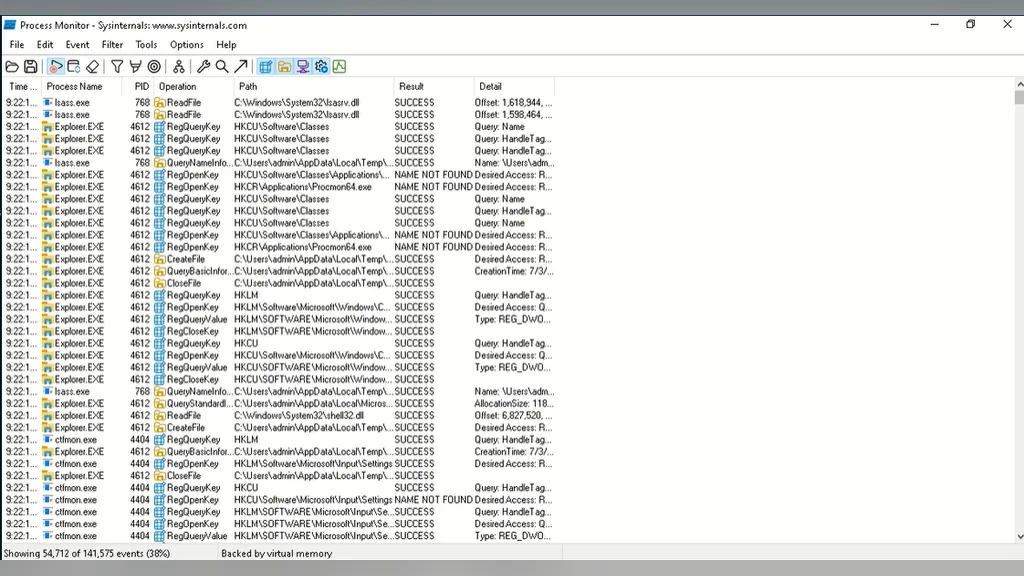
To directly answer the question, “Who created Process Monitor?”, the history dates back to Mark Russinovich and Bryce Cogswell. Process Monitor is an essential tool in Microsoft’s Sysinternals suite, designed to monitor and display all system activities in real time, including interactions with the file system and the Windows Registry. It wasn’t created ready-made; rather, it is a powerful fusion of two older and equally crucial utilities: FileMon, which monitored file system activities, and RegMon, focused on analyzing the use of the Windows Registry. Together, these components formed ProcMon, making it a gold standard in operating system diagnostics.
The historical and technical relevance of Process Monitor is undeniable. Its genesis is an excellent case study in software evolution: it was initially developed by professionals employed at NuMega Technologies and later integrated into the SysInternals catalog. The trajectory of ProcMon reflects the growing need for diagnostics in increasingly complex environments. The tool is written in C++ and adapted for various environments, from Windows XP SP2 up to Linux systems. This history shows how a diagnostic need—whether detecting read/write failures of registry keys or mapping file system events—drove the creation of a utility that became indispensable for administrators and researchers.
In this article, we will dive deep into the journey of this vital diagnostic tool. We will explore the tool’s genesis, from its early days at NuMega to its consolidation within SysInternals. We will address the challenge of monitoring the operating system in real time, detailing how Process Monitor maps actions in both Windows and Linux environments. Furthermore, we will trace its evolution, showing how it transitioned from a classic Windows utility to a modern, vital component in digital forensics, ensuring you understand not only what it does, but how it came to be.
Key Points
- Monitors low-level (I/O) interactions in real time, tracking system calls and process activities.
- Unified functionalities from specialized tools like FileMon (file system) and RegMon (Registry).
- It is cross-platform, supporting Windows (v4.13) and Linux, consolidating diagnosis into a single tool.
- Allows filtering events with surgical precision by specific processes, file paths, or Registry keys.
- Developed by Mark Russinovich and Bryce Cogswell, it is written in C++ and is a pillar of forensic diagnostics.
Process Monitor Summary
| Alternate Name | ProcMon |
|---|---|
| Developers | Mark Russinovich and Bryce Cogswell |
| Original Author | Winternals Software |
| Platforms | Windows XP SP2 and later, Linux |
| Language | C++ |
| Included In | Sysinternals |
| License | Windows: Commercial; Linux: MIT License |
| Repository | github .com /microsoft /ProcMon-for-Linux |
| Available At | English |
The Genesis of the Tool: From NuMega to SysInternals
The history of Process Monitor (ProcMon) did not begin as a general-purpose diagnostic tool, but rather as a highly technical and corporate necessity. The architects behind this essential utility were Mark Russinovich and Bryce Cogswell. Initial development occurred in a context of high demand for deep visibility into the operating system’s internal workings. The tool’s early versions were associated with a development effort that went through NuMega Technologies, a crucial period that laid the groundwork for the modern ProcMon.
Robust diagnosis of a modern operating system requires observing multiple layers of activity. Initially, ProcMon consolidated functionalities from other important utilities, such as FileMon and RegMon. FileMon, for instance, was a free utility for 32/64-bit Windows systems that allowed users to monitor and display file system activity. Similarly, RegMon, also part of the SysInternals suite, provided detailed forensic information about Windows Registry usage. Both components, although vital, went through a lifecycle and, in some cases, ceased to be supported in their original forms, signaling the need for unification and modernization.
Consolidation within SysInternals
It was in this scenario of technical evolution that ProcMon was consolidated and expanded, becoming part of the SysInternals suite. The tool, which was written in C++, expanded its scope to cover not only Windows but also Linux. This transition demonstrated the maturity and breadth of the diagnosis. Currently, Process Monitor is available in various versions and licenses. On Windows, the stable version, for example, is v4.13, dated November 2, 2026, while for Linux, a preview version (v2.0 Preview) was released on July 22, 2024. It is important to note that while usage on Windows follows a proprietary commercial license, the Linux version operates under the MIT license, and the source code is maintained in a public repository on GitHub.
This trajectory—from corporate-level diagnostic needs, through the aggregation of specialized tools like FileMon and RegMon, to its maturity as a cross-platform C++ diagnosis—not only ensured the survival of knowledge but also elevated Process Monitor to a standard reference in forensics and operating system diagnosis, making it an indispensable resource for IT and security professionals.
The Challenge of Diagnosing the Operating System
Diagnosing a modern operating system is, by nature, an observational challenge. Current operating systems do not function in isolated layers; they represent a complex ecosystem where processes, the file system, and the Windows Registry constantly interact in a continuous flow of events. Trying to understand an error or an anomalous behavior without visualizing this web of interactions is like trying to diagnose a complex engine by only looking at the exhaust pipe. The central problem that Process Monitor (ProcMon) solved was the difficulty of cohesively and tracking all the actions that a program or process attempts to perform at the lowest level of the system, in real time.
Historically, diagnosing these problems required technicians to use separate, specialized tools. If the suspected issue was a problem writing to a file, a file system monitor was used. If the suspicion was a system configuration failure, a Registry monitor was necessary. However, these monitors operated in silos. What happened when a program tried to read a Registry key and, simultaneously, write a file to a protected directory? Separate diagnoses failed to present the complete context and sequence of events. The need for a unified view, one that could capture the flow of system calls in a single data stream, was immense.
The Need for Real-Time, Low-Level Visibility
To truly understand what is happening under the hood of a system, a monitor is needed that operates in real time and at a highly granular level of detail. ProcMon was designed precisely to fill this gap. It doesn’t just report an error; it reports on the *attempt* of interaction. For example, it can detect failed attempts to read or write keys in the Registry, in addition to detailing how applications utilize files and dynamic link libraries (DLLs). The ability to filter by process IDs, specific values, or file paths made it an indispensable tool for forensic analysis and high-level technical support.
This monitoring function was achieved by combining powerful functionalities that were previously handled by distinct tools. For example, FileMon, which monitored file system activity, and RegMon, which focused exclusively on Registry monitoring. By consolidating these resources into a single platform, ProcMon allowed developers and engineers to have a synergistic and complete view. Although the initial versions of ProcMon were used on systems like Windows 2000 SP4, the tool became increasingly robust, becoming essential for more modern environments, such as Windows Vista and subsequent versions.
This diagnostic evolution not only made life easier for engineers; it standardized how complex failures are investigated. The result is a tool that goes beyond simply reporting an error; it tells the complete story of the interaction, showing *why* and *when* one component failed to interact with another, solidifying Process Monitor as a pillar of complex operating system diagnostics.
The Union of FileMon and RegMon in the Creation of ProcMon

To understand the power of Process Monitor (ProcMon), it is essential to look back at the previous diagnostic landscape. Historically, the challenge of observing the operating system was so complex that it required specialized tools, each focused on a specific layer of activity. Robust diagnosis of a modern system, however, cannot be achieved by observing only one component; a holistic view is necessary. It was in this context that powerful diagnostic tools emerged, such as FileMon and RegMon, which represented the pinnacle of monitoring in their specific areas.
FileMon and RegMon: The Pioneering Monitors
FileMon, for example, was a free utility designed for 32-bit and 64-bit Microsoft Windows operating systems. Its focus was incredibly specific and vital: monitoring and displaying file system activity. It allowed technicians to track in detail which files were being accessed, created, or modified. Concurrently, RegMon, also part of the Sysinternals suite, was dedicated to Windows Registry forensics. It provided a granular view of Registry usage, allowing tracking of changes in critical keys that govern system behavior. Both tools were incredibly valuable diagnostic pieces, but each operated within an information silo.
The turning point and the true technological advance came with the consolidation of these functionalities. Process Monitor did not emerge as an added feature, but rather as the intelligent aggregation of what FileMon and RegMon did, and much more. By unifying file system and Registry monitoring on a single platform, ProcMon amplified the power of observation. Instead of a technician needing to run two (or more) distinct tools and manually correlate the results—a time-consuming and error-prone process—ProcMon presented all the data in real time, in a cohesive and navigable stream.
This union was not merely a matter of convenience; it was a leap in diagnostic capability. ProcMon was able to map, simultaneously, the process’s interaction with the file system, Registry usage, and API calls, all under the same observation umbrella. This 360-degree view capability drastically simplified the investigation of complex failures and malware, which often left traces scattered across different layers of the operating system.
It is crucial to note, however, that the advancement was so significant that the predecessor tools, FileMon and RegMon, are no longer supported by the developers. Although they were fundamental in paving the way and educating the market on granular diagnosis, ProcMon assumed its role as the primary monitor, consolidating itself as the reference diagnosis in the SysInternals toolkit. This evolution ensured that engineers and analysts always have a single, updated source to understand what was really happening under the system’s hood.
How Process Monitor Maps Real-Time Activities
Process Monitor (ProcMon) is much more than a simple log viewer; it is a real-time operating system activity mapping engine. Its technical functionality lies in its ability to intercept and display, in a granular manner, virtually all low-level interactions that a program or process performs with the system. Practically speaking, it acts as a detailed mirror of the computer’s I/O (Input/Output) operations, allowing engineers and analysts to track the flow of data and commands in real time.
How Monitoring Occurs
The power of ProcMon lies in its scope. It is not limited to a single type of activity. It records and displays in real time all read, write, and delete actions that occur in two fundamental pillars of the system: the Windows Registry (Registry) and the file system. When an application tries, for example, to write a specific value to a Registry key, or when it tries to access a file that does not exist, Process Monitor captures that event. This ability to monitor both the file system and the Registry simultaneously is what gives the tool its unmatched diagnostic value, allowing it to trace the origin of failures or unusual behaviors.
For diagnosis to be effective, Process Monitor offers an extraordinary level of control and precision through filtering mechanisms. Instead of being flooded by millions of system events, the user can refine the monitoring to focus exactly on what is relevant. It is possible to create complex filters based on various data criteria, such as:
- Specific Processes: Monitor only the actions of a particular executable.
- File Paths: Track interactions only with a specific directory or file type.
- Registry Keys: Isolate events involving a specific path in the Registry.
This filtering capability is what transforms ProcMon from a mere log recorder into a surgical diagnostic tool. It allows the analyst to isolate the root cause of a problem in a complex environment.
Application in Forensics and Debugging
In software debugging environments, Process Monitor is indispensable. It helps developers understand exactly why a program failed or why it behaved unexpectedly by mapping every attempt to access resources. In the field of digital forensics, its function is equally critical. When investigators need to reconstruct what happened on a computer after an incident, ProcMon allows them to track the history of which files were accessed, which registry keys were modified, and what operational flow led to a certain system state. In summary, it provides the complete digital trail, making it a fundamental pillar for system administration and security incident investigation.
Evolution and Adoption: From Classic Windows to Modern Linux
The journey of Process Monitor (ProcMon) is a direct reflection of the evolution of the operating systems themselves and the diagnostic needs in increasingly complex software environments. Originally, the tool was born from the expertise of Mark Russinovich and Bryce Cogswell, professionals associated with NuMega Technologies and, later, SysInternals. ProcMon emerged from the consolidation of predecessor utilities, such as FileMon and RegMon, transforming into a deep-level system activity observer. In its early iterations, which reached version 2.8, ProcMon was already capable of monitoring the Windows 2000 SP4 with Update Rollup 1, establishing a robust and highly detailed diagnostic standard.
Over the years, the tool has established itself as a pillar of diagnosis in Microsoft environments. Although older versions were pioneering, the support and development continued to keep pace with Windows innovations. Currently, the latest stable version for Windows operates starting from Windows Vista and subsequent systems. This cycle of updating and refinement allowed ProcMon to evolve from a simple log recorder into an activity mapping engine that handles the Registry, files, and processes with extraordinary precision. The monitoring power, which detects read and write attempts on registry keys and maps the use of files and DLLs, is what ensures its continued relevance in the Windows ecosystem.
Expansion to the Unix-like Universe
One of the most significant leaps in ProcMon’s history was its transposition beyond the Microsoft ecosystem. Initially, ProcMon was restricted to Windows. However, in November 2018, Microsoft announced an important portability move, confirming that several SysInternals tools, including ProcMon, would be adapted to run in Linux environments. This expansion not only maintained diagnostic utility on non-Windows platforms but also transformed the source code into an open-source project, a crucial advancement for the security and development community.
The port to Linux is notably open source, following the MIT license and available in the repository github.com/microsoft/ProcMon-for-Linux. This open code guarantees that the community can contribute to the development and adaptation of the tool in Unix-like environments. The development cycle reflects this platform duality: while the stable version for Windows was slated for v4.13 on November 2, 2026, the version for Linux had a Preview release on July 22, 2024. This development trajectory, transitioning between proprietary commercial software for Windows and open MIT code for Linux, attests to the legacy and adaptability of Process Monitor in any operating system requiring a surgical diagnosis.
The Legacy of ProcMon in Digital Forensics
Process Monitor (ProcMon) has transcended the role of a mere diagnostic utility; it has established itself as a fundamental pillar in IT system architecture and, crucially, in digital forensics. Developed by Mark Russinovich and Bryce Cogswell and included in the Sysinternals package, ProcMon allows systems professionals and security analysts to dive into the most granular activity of an operating system. Its ability to map low-level interactions—such as file system accesses, Registry modifications, or API calls—in real time provides an unprecedented level of visibility. In an environment where failure or intrusion can be invisible to the average user, ProcMon acts as a forensic mirror, capturing every digital step of a process.
The Importance of Low-Level Tracking
In security investigations, this ability to track interactions at such a deep level is vital. Sophisticated malware or malicious processes often hide from higher-level logs. It is ProcMon that allows analysts to track, for example, whether an executable is trying to write to a prohibited location in the Registry or if it is accessing a file without permission. This functionality makes it indispensable not only for diagnosing critical software failures but also for identifying attack vectors and understanding how a system was compromised. The precision and comprehensiveness of ProcMon monitoring ensure that no relevant low-level event is overlooked.
The establishment of Process Monitor as a market standard is a testament to its robustness and adaptability. The tool, written in C++, has accompanied the evolution of operating systems, maintaining its relevance on platforms from Windows XP SP2 and newer versions, to the Linux ecosystem. This transition from a proprietary environment to open source is notable: while its Windows version retains the status of proprietary commercial software, it is available at Sysinternals. On the other hand, its port for Linux follows the MIT license and is accessible at the repository github.com/microsoft/ProcMon-for-Linux.
The lifecycle and constant evolution of ProcMon, evidenced in versions such as the stable v4.13 (released on November 2, 2026, for Windows) and the preview v2.0 (released on July 22, 2024, for Linux), reinforce its status as a reference tool. It not only reports what happened but also helps answer the “how” and “why” of anomalous system behavior. In short, ProcMon is more than an event monitor; it is the instrument that provides surgical depth to system analysis, making it an essential resource for software engineers, system administrators, and especially for security incident response specialists.
Frequently Asked Questions
What is Process Monitor and what is it used for?
ProcMon is an essential diagnostic tool that maps operating system activities in real time. It solves the difficulty of tracking all of a program’s actions at the lowest level, providing a unified and coherent view of complex interactions. It is used to understand the why and when of failures in operating systems.
Does Process Monitor monitor only the Windows Registry or files as well?
No, it monitors both fundamental pillars of the system. It records and displays in real time all read, write, and delete actions that occur both in the Windows Registry and the file system. This capacity for simultaneous monitoring gives it unparalleled diagnostic value.
Is it possible to use Process Monitor on Linux operating systems?
Yes, Process Monitor is cross-platform. Although it was initially developed for Windows, it expanded its scope to cover Linux as well. The Linux version is available in preview and keeps the source code in a public GitHub repository, demonstrating its breadth.
Is it safe to use Process Monitor on a work computer?
It is considered a pillar of complex operating system diagnostics, making it indispensable for IT and security professionals. Its function is to map the flow of system calls, allowing the identification of failures and anomalous behaviors. It is a high-level diagnostic tool, not preventative security software.
What is the difference between using Process Monitor and an antivirus?
ProcMon is a diagnostic tool that maps the real-time flow of system calls, showing *how* a program interacts with the system. While an antivirus focuses on preventing and detecting known threats, ProcMon offers a detailed view of *why* and *when* a component failed to interact, making it crucial for forensic analysis.
Conclusion
The journey of Process Monitor (ProcMon) reflects the evolution of operating system diagnostics itself. What started as a highly technical necessity, conceived by Mark Russinovich and Bryce Cogswell, transcended the role of a simple utility. It established itself as a diagnostic pillar by solving the central challenge of modern systems: the interdependence of their layers. While pioneering tools like FileMon and RegMon were vital in their specific areas—monitoring, respectively, the file system and the Windows Registry—they operated in silos. ProcMon unified this view, allowing it to track the complete flow of system calls in real time, showing the context of a complete interaction, and not just isolated parts of it.
This capacity for synergistic observation has transformed ProcMon into an indispensable resource. Its evolution, which led it to be written in C++ and become cross-platform, covering both Windows and Linux, attests to its maturity and scope. Whether analyzing the stable version for Windows, such as v4.13, or the preview version for Linux, the principle remains: providing a granular and cohesive view of what is happening under the hood. It is this holistic view that it offers, transforming complex data into clear narratives of failures and interactions.
Therefore, understanding ProcMon means understanding that system diagnostics are not about monitoring components, but about observing the ecosystem of interactions. By mastering this tool, the IT and security professional is not just diagnosing an error, but unraveling the complete history of the system. It is time to put this knowledge into practice: dive into the code and logs to transform the mystery of a complex system into a precise and actionable diagnosis.